Страницы

воскресенье, 30 июля 2023 г.

Yuzu emulation with rx 580

 Recently, I've had an experience of running nintendo switch games on windows 10 using Yuzu emulator on amd gpu.

Setup:

Amd Radeon RX 580 gpu

3.0 GHz cpu, 8 cores (16 threads)

My observations so far:

1. Mario odyssey runs in slowmo (when you observe many visual objects). This is easily reproduced on first level. Fps is not high too (20-23). 

2. If we uncheck the box "Use fast gpu time (hack)", the performance increases about 2 times. Slowmo is no more there and fps is about 38 FPS, sometimes dropping, but not below 25. But the quality drops too, we've got pixels :). Same behaviour can be achieved setting baseline to 2x (with fast gpu time hack disabled)

3. If we install all mods, we get rid of some frame drops but not all the time. Mods:

(I used yuzu mode downloader and default official server. See install instructions here https://github.com/amakvana/YuzuModDownloader#installation)

4. As I said, sometimes we still get frame drops and slowmo. 20-23 fps exactly. E.g. playing the level beginning after Harriet boss (after falling into hole) gives slowmo. 

The observations at first looks like https://www.reddit.com/r/yuzu/comments/i9zy8q/very_low_fps_on_rx_580/. And the cure, suggested there (except buying new video card, not acceptable in my case) is making more mhz on the cpu. Recommended system requirements of yuzu is also higher than I have (3.6ghz > 3.0ghz) Tried cpu overclocking to 3.6. With no luck. If we check mhz consumed by yuzu, it's not that most all the time, it is 1.5ghz - 3.6ghz, but lags persist all the time, so it's not about cpu.

5. As mentioned on reddit and in some docs on yuzu (https://yuzu-emu.org/wiki/deprecated-building-mesa-on-arch-linux/) we can achieve decent performance (with amd gpu) on linux. So I've installed and checked 2 games: mario odyssey and Astral chain. I'm sharing my observations and setup with you.

Ubuntu 22.04.2 LTS

Mesa gpu driver 22.2.5 (out of the box, note I've connected to internet during ubuntu installation, kisak 23.1.4 gives same performance)

Mario odyssey:

Cut scenes works without freezes, it's way better than on windows (with all settings I've tried there).

Game runs better, most time I have 25-38 fps, but still dropping to 20-23 (with slowmo) mostly on level begins (many visual objects - houses, trees, characters). Game is more playable than on windows.

Setup: vulkan, force cpu clocks checked.

Astral chain:

Opengl spir-v (experimental, mesa only. Important, to not get huge drops in menu and character select), accuracy is normal (important! To not get huge fps drops on character select)

I've also made some graphics lowering, but not tested if that help actually:

Vsync off,

Quality medium,

Anisatrophic filtering 2x.

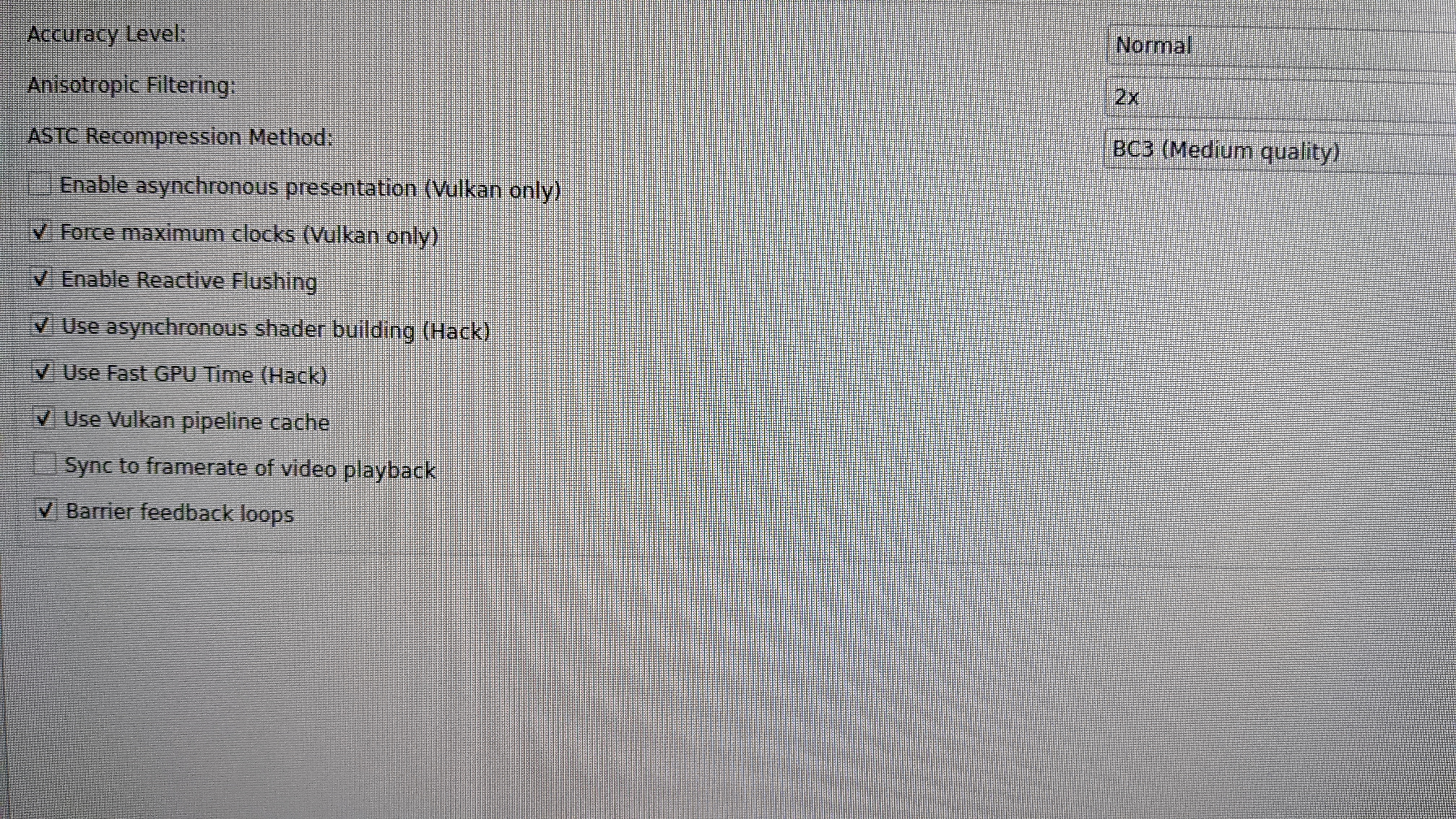
Thats the setup:


This way I get 30 fps all the time (menu, intro, character select). But 15-20 fps in combat. And solid freezes in intro after race ends.

6. Note on Ryujinx. Mario works way better in this emulator, tested on same linux, opengl backend. 45-60 fps. But have freezes sometimes (shaders compile synchronously?) It's still linux as I already switched my test environment.

In Astral chain ryujinx gives same results as yuzu (30 fps menu, character select; 25-30 intro). But when we compare fps in combat, ryujinx is 22-25 fps (opengl) while yuzu is 15-20 fps. And both have freezes sometimes (shader compile), but with ryujinx they gradually disappear while you play (shader cache).

Tried to get more smooth gameplay with ryujinx+Vulkan. It gives 30 fps menu, 18-23 intro and char select, 20-30 fps, but dropping sometimes to 15. Fps drop with combat and intros is quete annoying. For sure, opengl is better with this game at the moment of writing.

Note: disabling vsync and setting anisotrophic filtering to 2x can give small performance increase.

7. Note on nvidia. I've got laptop from friend and checked astral chain and mario in windows. Both works ok (mario 35 fps, astral chain 30 fps) with some minor changes to setup: set opengl glasm (nvidia only). I've also set to use async shader building: looks like have less freezes on shader compiling, noticible in astral chain. Mods not applied at all. But yuzu gives low fps in combat (15-20).

Ryujinx gives the following results:

For mario better, 40-45 fps. 

For astral chain fps menu-first intro-character select is about same 25-30 fps, while in combat it's better, 25-30, but have stutters (new enemy, new fx, looks like shader compiling freezes main thread), which dissappear while you progress on the game (shader cache works I think), so this game is played much better with Ryujinx.

Test setup: asus g14 zephyrus laptop with nvidia geforce rtx 2060 with max-q design (running in energy saving mode btw)

1920x1080 display


Conclusion

If you have nvidia card, then you are good to go with windows, opengl (select glasm for yuzu).

 Ryujinx shows better fps in both idle and in combat or when there are many visual objects in the games chosen. Freezes in astral chain with ryujinx+opengl are going away gradually as you play. Yuzu shows lower fps (15-20 vs 20-25) than ryujinx on both linux+amd and windows+nvidia then ryujinx+opengl.

Ryujinx for mario is excellent with nvidia gpu (40-45 fps).

If you have amd radeon gpu, then it's better to be on linux with opengl. Both yuzu and ryujinx can run in linux with almost same performance. But when it comes to mario and ryujinx, radeon is better in fps (45-60 vs 40-45 nvidia), but have more noticible freezes. If you switch to yuzu to eliminate freezes with this card, 25-38 idle and 20-23 slowmo when there are many visual objects (level begins is the most common case). So nvidia is better for mario (because of less freezes and acceptable fps).

In astral chain, both yuzu and ryujinx shows noticible freezes, but ryujinx+opengl is better because of fps. And freezes are going away gradually as you play. And if you compare what we have for astral chain with nvidia, we will see that with amd radeon we have a fps drop (comparing these 2 video cards) in combat: amd 20-25 vs nvidia 25-40. Yuzu loses with radeon as it gives less fps without anything being better in stutters.

So, mario is excellent with nvidia and ryujinx+opengl on windows. On radeon you need linux and need to choose either lower (but acceptable) fps + minimum slowmo with yuzu+opengl. Or more slowmo but higher fps (48-60) (ryujinx+opengl/ryujinx+vulkan).

As it comes to astral chain, ryijinx+opengl is better choice. Vs same ryijinx+opengl on linux for amd card. Nvidia gives better fps when it comes to combat (25-30 vs 20-25 fps).

PS vulkan+ryujinx, nvidia, crashes in my setup.


What I personally select

I personally select ryujinx+opengl for nvidia (windows) for both mario & astral chain. And ryujinx+opengl (linux) for astral chain as they give better fps in combat then yuzu in any configuration. Same ryujinx+opengl for mario and luigi mansion 3 (luigi mansion not very much playable as it drops to 22 fps in many places).

As for amd gpu (linux), mario is better with yuzu+opengl because with disable mods it runs with much less slowmo, generally fps is lower than with ryujinx, but all in all it's more comfortable because of less slowmo and high fps with ryujinx is not needed (60 fps).

Note: I tested 2 games here. With other games it may be other choices. E.g. luigi mansion 3. The best I got, it is about 15-18 fps on radeon ryujinx+opengl (vulkan gives 4, yuzu gives ugly result on both backends). And on nvidia it's 22-24 fps with yuzu+opengl. Tested in first room after intro, character walking.

Checked options to note: async shader building (yuzu), 2x anisotropic filtering, normal accuracy (yuzu, important), vsync off(yuzu, not ryujinx), bilinear window adapting filter, no anti-aliasing, use fast gpu time (for quality, a bit better than set baseline)

четверг, 12 мая 2022 г.

How to fix most "LAN server not found" problems in Windows 10

 Hello, guys! Most of the solutions found in internet, even from support (example here) talks about machines must be reachable and be on same subnet (e.g. 192.168.x.x). But I didn't find anyone saying why and how to do that easily (workarounds exists, but don't guarantee 100% working).

So, at first, let's understand why. Computer reachability can be easily checked typing (in cmd, Run -> cmd, enter):

ping <ip here, better ip4, e.g. 192.168.1.106>

But it's not enough for games. I have had a hard time setting up connection in Sacred. Both PC was connected to same router through same wifi. Both can "ping" each other successfully. But Sacred wount work. While other game works. So what may be the problem with Sacred?

Let's investigate. To know the network registration (IP), we can type:

ipconfig

Usually, we will see only one registration here. But nowadays, when we have virtualization, vpns, etc., we will see several. It's because several network connections created to provide virtualized OSes the connectivity or even register our PC in other part of the world. 

The problem is that game selects one of the connections, not scan all of them (especially old ones). The solution is to restrict acces to them or disable them for time playing. Many ways to do that. That's one way to disable:

1. Open network adapters window. E.g. type in cmd:

ncpa.cpl

2. Disable each adapter except the one that gives you connection (right click, select disable). Note: you need to reeanable all disabled adapters after playing. So better write them down before.

3. Check you still reach PC, that will be running as server. E..g. type in cmd:

ping <ip of other PC>

That's all! You can run the game and ensure it will find server host!

Solution tested on:

Sacred (first),

Battlefront 2 (2005 year)


Will note, that there are easier solution which may be not affordable for all. You connect both PCs to some VPN. From now on, they are on same network and by default, game must use this connection. It's how I trobleshooted playing Neverwinter Nights Enhanced Edition. Sadly, it's not working for all, e.g. for Battlefront 2.


Hope this helps someone. Thank you for reading!

вторник, 6 августа 2019 г.

Unity code: assets saving and importing

When you have unsaved changes, you need this method: AssetDatabase.SaveAssets();
When you changed assets externally: AssetDatabase.ImportAsset(asset) or AssetDatabase.Refresh()
Note: both have ImportAssetOptions. Interesting ones:
  - DontDownloadFromCacheServer - helpful to trobleshoot cache server problems,
  - ForceSynchronousImport - in new versions of unity, asset import can be async. So, if your code requires all assets imported, you need to block, so use this option.

четверг, 31 августа 2017 г.

Опасный DontDestroyOnLoad

DontDestroyOnLoad позволяет компоненте пережить загрузку/перезагрузку сцены. По сути они живы пока жив процесс приложения. Порой, их становится все больше компонент (по сути почти все что работает с нативом - хелпер крашлитики, загрузчик obb, нотификации, дзендеск и др.). Подводный камень DontDestroyOnLoad в том, что он действует на сам gameObject. Это может быть неожиданно для скриптов, которые уже висели на этом gameObject :) Чтобы подстраховаться от такой неприятной случайности можно не дергать этот метод а вместо этого писать над классом атрибут RequireComponent(typeof(DontDestroyOnLoad)).

public class DontDestroyOnLoad
{
  private void Awake()
  {
    DontDestroyOnLoad(gameObject);
  }
}

Тогда хотя бы в редакторе видно не залезая в код, каким компонентам нужен DontDestroyOnLoad - он добавится автоматически.

Решил поделиться. Хотя вообще проще сделать отдельный gameObject в старт-сцене, а на нем повесить какой-нибудь DontDestroyOnLoadController и все компоненты, которым нужно такое поведение. В этом компоненте еще можно и порядком инициализации управлять.

PS внимание, все что DontDestroyOnLoad всегда висит в памяти, а значит нужно озаботиться о том, чтобы ссылаться на как можно меньше ресурсов и выгружать их как только они стали ненужны

четверг, 15 июня 2017 г.

When Unity loads obb automagically?

When Unity loads obb automagically? When it resumes from pause. So, UnityObbDownloader plugin works because it starts it's own activity (so unity activity paused) after downloading, unity activity resumes so file is downloaded. Of course, obb loaded automagically at unity app start too.

Which code may be used to force check obb:

(javacode, you need to implement regular android activity in java to do that, you may take com.unity3d.UnityPlayerActivity as example)
unityPlayer.pause();
unityPlayer.resume();

Not working code, which you may find all over internet:

1. WWW www = WWW.LoadFromCacheOrDownload("file://" + obbPath, 0);
yield return www;

2. yeild return new WaitForSeconds(3-5);

So, people asking why it's not working for them actually may be not using UnityObbDownloader so no activity, no pause, resume, you've got the point.

It's a shame for Unity that they don't document it anywhere and didn't do a method to check for obb. Because, regular Unity game uses one activity with one UnityPlayer in it and if you download drawing your UI in game style like we all do now you have 2 options after download finish:
1. quit app. On next launch Unity will check for obb and use it
2. trigger pause-resume somehow (invisible activity or code I tested above). Weird

воскресенье, 21 мая 2017 г.

How Unity notifies about innerException: rethrow in stack

Suppose code:

public void TestCodeBelowRxChainExecutedDueExceptionHandled()
        {
            UiLogger.Trace("1");
            Observable.Return(1)
                .Select(a =>
                {
                    throw new InvalidOperationException("aa");
                    return a;
                })
                .Subscribe(
                    Actions.Empty,
                    exception => Debug.LogException(new AssertionFailedException(exception, "mmm assertion failed")); // (*)
            UiLogger.Trace("2"); // not reached if not (*)
        }

четверг, 11 мая 2017 г.

Rx in Unity with favor to synchronous code

Let's look at what rx is. Someone says it's about thinking of asynchronous operations as data flows and of rx operators as flow combining operations - join, merge, concat, transform (select/selectMany), etc. I prefer thinking that way. And yes, rx is somewhat about functional programming, it can be combined with LINQ.

суббота, 6 мая 2017 г.

воскресенье, 9 апреля 2017 г.

Top100 Unity errors

In my programming practice, I encountered many code construction errors. Most worse are hidden. All works, but bugfixing and extending functionality is a nightmare. I will write some which are funny or puzzling in my blog.

1. Created object shows "null" in debugger.

Suppose code:
public class LocationsDB : MonoBehaviour { ... }

locationsDB = new LocationsDB();
Why do you think, debugger can say us, that locationsDB is "null" ?

суббота, 21 января 2017 г.

Why I prefer longer class names even when namespace guarantees no name conflict

Suppose:

namespace Tutorial {
class CarnavalEventTutorial {...}
}


I keep Tutorial at end of class because 2 reasons:
a. you may keep some field with the same name, e.g.

public CarnavalEvent CarnavalEvent { get; private set; }

And you don't get name collision here. And no collision with class name too.

b. Suppose, that you can set that Tutorial as field of Unity component in editor. Unity editor wount show you namespaces, so you'll get 2 CarnavalEvent and can't diferentiate which one is Tutorial and which is not. More ugly example:

namespace Windows
{
    namespace Shop
    {
        public class Window : MonoBehaviour {}
    }
}

So, in Unity you'll see Window component and may decide that it's basic component. While it's not.

And one more bad thing, suppose you want to include that "Window" in code:


public class EventTracker {
private List<Window> windows;
private Windows.Shop.Window shopWindow; // you need that, again, to tell reader that it is ShopWindow. And to fix compiler error.
}

So, trying to make names short you make them longer instead :)

Minuses:
The price for that is longer names. But, again, that rule don't ask to include all the names from namespace. E.g.:

namespace Game {
namespace QuestParts {
namespace Tutorial {
class CarnavalEventGameQuestPartsTutorial {...} // not needed
}
}
}

Because, usually, you wount get CarnavalEventTutorial at different levels of namespaces.

So, the rule is: CONSIDER DUBLICATING NAME FROM ENCLOSING NAMESPACE IN CLASS NAME

вторник, 10 января 2017 г.

понедельник, 1 августа 2016 г.

Contact

Send e-mail to vnms11@gmail.com

IZEng - engine for game development

IZEng is an open-source game engine with 2D graphics onboard. It encapsulates DirectX work. It includes simple movement models: linear, angular. Supports acceleration, friction, gravity if needed. RockCarrier is one of my games, which is developed on the base of this engine. Documentation included, but not full.

If you have questions, contact: vnms11@gmail.com. Title the letter "IgriZdes Engine".

I developed this small engine when I was studying in the University, so don't be surprised.
Source code with documentation on github  Download

понедельник, 4 июля 2016 г.

Building and running Android Studio gradle project on android device

Recently I was just checking out if AIDE team added support to build gradle-based projects. So, indeed they added:

AIDE also supports basic Android Studio projects, which follow the default project structure. The full gradle build system is not yet supported though
(source: http://www.android-ide.com/tutorial_androidstudio.html)

So, if your gradle setup is simple, you can just open your android project in AIDE and run.

But what to do if not? As before we have a workarond: create eclipse project files (.classpath + .project) for our project. AIDE works with eclipse project structure quite well. But what to do with the dependencies? It's insane to write all of them by hand. Likely, LibGdx enthusiasts gives us script which generates those strings for us (see for example eclipse task here)

I'll give details on example of how to build & run LibGdx gradle project in AIDE.

суббота, 30 апреля 2016 г.

MSI X99A SLI PLUS Windows 10 hang issue resolved

I've become a happy owner of MSI X99A Sli Plus mobo. I already read about many issues with asus burninng, msi burning, random Windows hangs due to problems with USB. And I want to say that I encountered nothing of that with my MSI mobo (bios 1.9, recently updated it to 1.B).

But I encountered an annoying hang for which I found a solution, so I want to share it because I don't see it anywhere on the web.

Problem: after unplugging PC from the outlet and plugging back Windows 10 hangs for the first time.
Solution: insert USB stick in one of the USB3.1 slots. You just need to keep 1 USB3.1 slot occupied to not run into that problem

четверг, 7 апреля 2016 г.

C#: Why Dictionary with hashcode as key is dangerous

Recently, I encountered following code:

        private readonly Dictionary<int, View> _listCellsForDisposal;
            if (!_listCellsForDisposal.Contains(view.GetHashCode()))
             {
                _listCellsForDisposal.Add(view.GetHashCode(), view);
             }

The intent of that code is just add item to the list if it doesn't present. But is it doing work well? It doesn't. Let's see why.

At first, let's look at the signature of GetHashCode:

public override int GetHashCode()

So, it returns int. int in c# is platform-dependent. For example int32 takes 4 bytes, it's range is:

-2,147,483,648 to 2,147,483,647

(source: https://msdn.microsoft.com/ru-ru/library/5kzh1b5w.aspx)

But how many objects can we add to the dictionary?

среда, 9 марта 2016 г.

Why static is pain

Bugs, related to static variables may be difficult to understand. I don't think it's worth investigating. As a general practice, just avoid keeping references to objects in static. When using a static reference you allways must ask youself when to free this static and when to use.

Example: keep reference to view in static variable. User closes our app, OS frees memory, so all statics are freed too. When user opens our app again, static gets newly created view. All is well.
Then, time passes and we add background running service in our app. So, when user quits our app OS can't just free memory - static may be accessed from our background service. And reference to view remains. Afterwards user open app again and static has view that was created FOR ALREADY DESTROYED VIEW HIERARCHY. And it is luck if it will work with new one. It is only one example of what can happen when using statics. Using statics is not bad. But statics need more attention from developer. They often must be freed explicitly (for example, recreated at app start). Better keep only primitive data in statics - ints, strings...

Connect to genymotion emulator from another machine via wifi

1. Change NAT to bridge in VirtualBox settings for emulator (network adapter is same used to access network using which you'll connect)
2. download adb wireless by henry (root)
3. enable debugging
4. disable all adb processes started by genymotion for emulator (I choose "use custom sdk" and then renamed adb.exe -> _adb.exe) and restart emulator
5. adb connect ip:5555
done
adb devices should say:
device (not offline)